|
 |
<%
'** Code for setting enabled/disbled links on left side of the page
PathOfHome =Application("NonSSLPrefix") & "/Default.asp"
PathOfHowtoBuyBooks =Application("NonSSLPrefix") & "/Home/HowToBuy.asp"
PathOfContactUs =Application("NonSSLPrefix") & "/Home/ContactUs.asp"
PathOfTrackyourOrder ="http://trkcnfrm1.smi.usps.com/netdata-cgi/db2www/cbd_243.d2w/output"
PathOfHowtoSellBooks =Application("NonSSLPrefix") & "/Home/HowToSell.asp"
PathOfIntroductionToSwapBooks =Application("NonSSLPrefix") & "/Home/Introduction.asp"
PathOfFrequentlyAskedQuestions =Application("NonSSLPrefix") & "/Home/FAQ.asp"
PathOfTestimonials =Application("NonSSLPrefix") & "/Home/Testimonials.asp"
PathOfLogin =Application("SSLPrefix") & "/Home/Login.asp?Referer=StraightFromLogin"
PathOfShoppingCart =Application("NonSSLPrefix") & "/Buy/ShoppingCart.asp"
PathOfLogOut =Application("NonSSLPrefix") & "/Default.asp?LogOut=Yes"
PathOfMyAccount =Application("SSLPrefix") & "/Account/MyAccount.asp"
PathOfVolumeSellers =Application("NonSSLPrefix") & "/Home/VolumeSellers.asp"
PathOfUsefulLinks =Application("NonSSLPrefix") & "/Home/UsefulLinks.asp"
If Instr(1,CurrentPagePath,"Default.asp",1)<>0 Then
PathOfHome="#"
End If
If Instr(1,CurrentPagePath,"HowToBuy.asp",1)<>0 Then
PathOfHowtoBuyBooks="#"
End If
If Instr(1,CurrentPagePath,"HowToSell.asp",1)<>0 Then
PathOfHowtoSellBooks="#"
End If
If Instr(1,CurrentPagePath,"Introduction.asp",1)<>0 Then
PathOfIntroductionToSwapBooks="#"
End If
If Instr(1,CurrentPagePath,"FAQ.asp",1)<>0 Then
PathOfFrequentlyAskedQuestions="#"
End If
If Instr(1,CurrentPagePath,"Testimonials.asp",1)<>0 Then
PathOfTestimonials="#"
End If
If Instr(1,CurrentPagePath,"UsefulLinks.asp",1)<>0 Then
PathOfUsefulLinks="#"
End If
If Instr(1,CurrentPagePath,"ContactUs.asp",1)<>0 Then
PathOfContactUs="#"
End If
If Instr(1,CurrentPagePath,"TrackOrder.asp",1)<>0 Then
PathOfTrackyourOrder="#"
End If
If Instr(1,CurrentPagePath,"Login.asp",1)<>0 Then
PathOfLogin="#"
End If
If Instr(1,CurrentPagePath,"ShoppingCart.asp",1)<>0 Then
PathOfShoppingCart="#"
End If
If Instr(1,CurrentPagePath,"MyAccount.asp",1)<>0 Then
PathOfMyAccount="#"
End If
%>
|
 |
 |
|
 |
 |
You can now buy & sell used textbooks and new books to avoid costly buyback policies at your campus bookstores, and to save time and money. It's FREE, secure and easy to post your items for sale on Swapbooks.com
|
Swapbooks.com is the ultimate marketplace for used textbooks and books. Try for yourself and you will see how easy and secure it is to make money and save money.
|
|
 |
| Search By ISBN : |
|
|
| Search By Title : |
|
|
For an Advanced Search by Title, Author or School to Sell Textbooks and Books,
Click Here... |
Sell Multiple Books
(for ISBN only) |
|
 |
| Search By ISBN : |
|
|
| Search By Title : |
|
|
For an Advanced Search by Title, Author or School to Buy Textbooks and Books, Click Here... |
|
|
| |
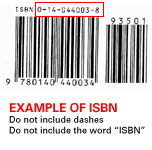
When performing your search for textbooks make
sure to enter the ISBN # .
The ISBN # is usually located on the back of your textbook.
|
|
|
 |
 |
|
|